server-side tracking Germany is the infrastructure layer that recovers measurement signal lost to browser privacy, iOS tracking restrictions, and ad-blocker prevalence. For German digital marketing programs in 2026, server-side tracking is no longer optional — it’s the foundation that determines whether your Google Ads algorithm sees 60% or 95% of your conversions, whether Meta Conversion API delivers a usable signal, and whether your attribution analytics reflect reality or fiction.
In this guide, we cover what server-side tracking is, why it matters for German market specifics (DSGVO, EU hosting, consent integration), how to implement Server-Side Google Tag Manager (sGTM), and how to integrate with Meta Conversion API, LinkedIn Conversions API, TikTok Events API, and similar platforms. This is the technical foundation that makes the rest of digital marketing measurement work in 2026.
What is server-side tracking and why does it matter?
Server-side tracking in Germany is the practice of collecting marketing events on your server (rather than the user’s browser) and forwarding them to ad platforms and analytics services from server-to-server.
Traditional client-side tracking (the old way):
- JavaScript pixels in the user’s browser send events directly to Google, Meta, etc.
- Subject to browser restrictions (Safari ITP, Firefox ETP, Chrome Privacy Sandbox)
- Blocked by ad blockers
- Affected by iOS App Tracking Transparency
- Loses 30-50% of signal in 2026
Modern server-side tracking:
- Browser sends event to YOUR server (often via lightweight tag)
- Your server enriches the event with first-party data (hashed PII)
- Your server forwards to platforms via their APIs (CAPI, GTM Server, etc.)
- Less affected by browser/iOS restrictions
- Recovers 20-40% of the lost signal, typically
- Better data quality through enrichment
Why server-side tracking matters specifically in 2026:
1. Algorithm optimization:
- Google Ads, Meta Ads, and LinkedIn Ads are optimized based on conversion data
- Better conversion data → better algorithm performance
- 20-40% improvement in CAC achievable from sGTM alone for typical sites
2. Privacy compliance:
- Hash PII before forwarding to platforms
- Implement the consent state correctly
- EU hosting for data sovereignty
- Better DSGVO posture overall
3. First-party data activation:
- Pass customer LTV, lifecycle stage, and segments to platforms
- Optimize toward business outcomes, not just clicks
- Cross-device matching via Enhanced Conversions
4. Channel diversification protection:
- Walled gardens (Google, Meta) losing signal hurts them most
- Server-side levels playing field with first-party infrastructure
- Reduces dependency on platform-controlled data
5. Future-proofing:
- Third-party cookies functionally dead
- Browser privacy will continue tightening
- Server-side foundations work regardless of browser changes
For broader context, see our marketing analytics attribution Germany guide and GA4 Consent Mode v2 Germany guide.
How does Server-Side Google Tag Manager (sGTM) work?
Server-Side Google Tag Manager (sGTM) is Google’s server-side container that runs on your infrastructure.
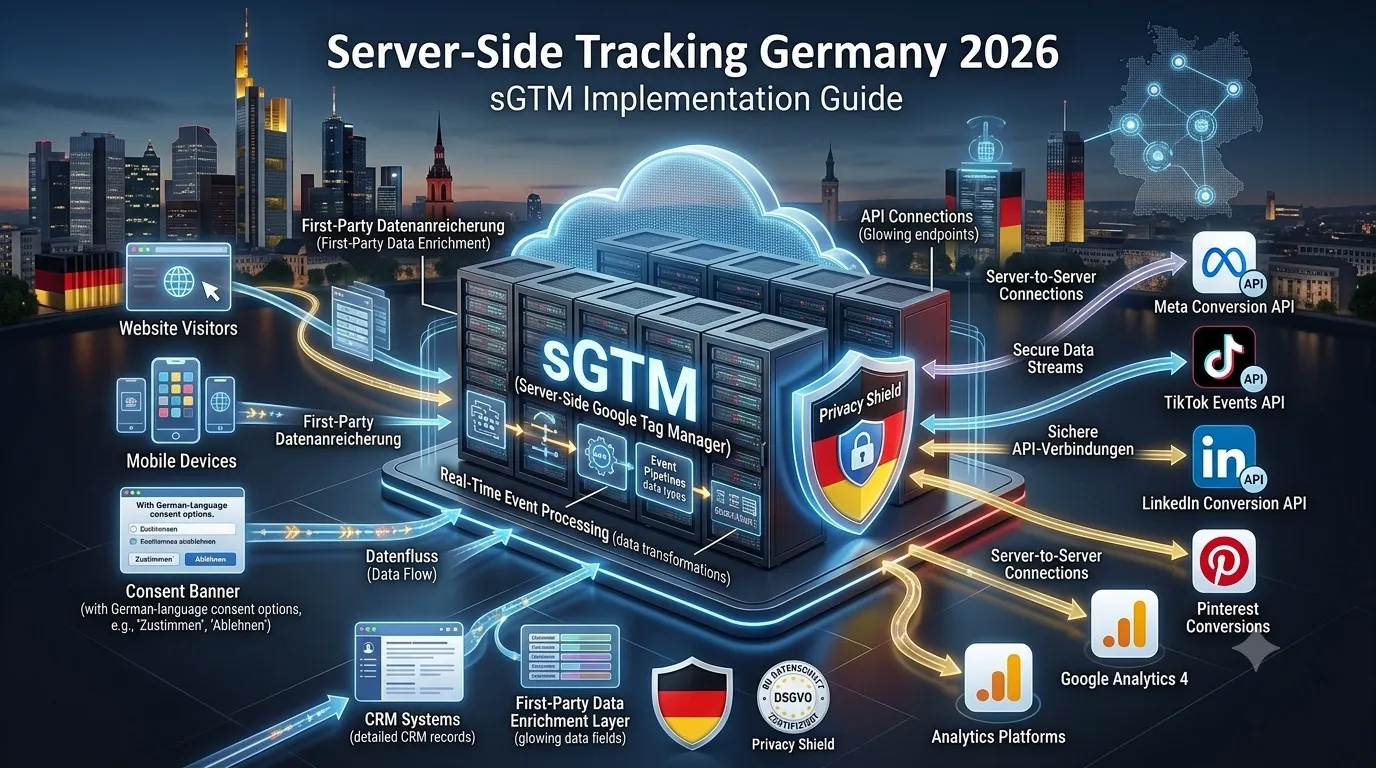
Architecture overview:
- Browser loads your website with the client-side GTM container
- Client-side GTM sends events to your sGTM endpoint (e.g.,
gtm.yourcompany.de) - sGTM (running on your EU-hosted server) receives events
- sGTM validates, transforms, and enriches events
- sGTM forwards events to platforms via their APIs:
- Google Analytics 4
- Google Ads (Conversion API and Enhanced Conversions)
- Meta (Conversion API)
- LinkedIn (Conversions API)
- TikTok (Events API)
- Custom HTTP endpoints
Hosting options:
Self-hosted on Google Cloud:
- Google App Engine or Cloud Run
- European region (Europe-West3 Frankfurt or similar)
- Cost: €40-€300/month for typical traffic
- More control, but requires Google Cloud expertise
Self-hosted on AWS, Azure, or own infrastructure:
- Frankfurt or the Berlin region recommended
- Docker container for sGTM
- Cost: €30-€200/month
- For teams already on these platforms
Managed hosting:
- Stape.io: managed sGTM hosting (Estonian company, EU servers)
- Tags: managed sGTM hosting
- Cost: €20-€500/month based on plan
- Simpler setup, less control
Hosted by agency:
- Some agencies provide sGTM hosting as part of engagement
- Cost: included in service fees
- Best for clients without technical capacity
For the German market, EU hosting is strongly preferred for DSGVO compliance. Stape.io and Google Cloud Frankfurt are popular choices. Most major Mittelstand programs use one of these.
How do you set up sGTM step by step?
Step 1: Create a server-side container in GTM
In Tag Manager:
- Create a new container, type “Server.”
- Note container ID
- Document configuration
Step 2: Set up server-side hosting
Either self-host or use a managed service:
- If Google Cloud: follow Google’s setup script
- If Stape: configure subdomain mapping
- If self-managed: deploy Docker container
Step 3: Configure custom domain
Set up a subdomain that points to your sGTM server:
gtm.yourcompany.de(recommended)- DNS A record or CNAME
- SSL certificate (Let’s Encrypt or commercial)
- Validates as first-party from the browser perspective
Step 4: Configure server-side container
In server-side GTM:
- Add GA4 Client
- Add Tag for GA4 forwarding
- Add Tags for other platforms (Meta, LinkedIn, TikTok)
- Configure event handling
Step 5: Update client-side GTM
In client-side container:
- Update the GA4 configuration tag to send to the server endpoint
- Add server-side transport URL:
https://gtm.yourcompany.de - Test in preview mode
Step 6: Configure platform integrations
Meta Conversion API Integration:
- Generate an access token in Meta Events Manager
- Configure CAPI tag in sGTM
- Test event delivery
LinkedIn Conversions API Setup:
- Set up the CAPI connection in LinkedIn Campaign Manager
- Configure CAPI tag in sGTM
- Test event delivery
TikTok Events API Configuration:
- Generate an access token in TikTok Ads Manager
- Configure tag in sGTM
- Test event delivery
Step 7: Test and validate
- Use GTM Preview mode for both client and server containers
- Verify events flow through the entire pipeline
- Check platform-side reporting confirms event receipt
- Compare to baseline metrics for delta
Step 8: Monitor in production
- Set up alerts for tag failures
- Monitor server health and uptime
- Check platform event quality scores
- Regular review of data quality
How do you integrate the Meta Conversion API (CAPI)?
Meta CAPI sends events from the server to Meta, complementing or replacing the browser Pixel.
Setup:
- Generate Access Token in Meta Events Manager
- Note Pixel ID
- Configure CAPI tag in sGTM with token + Pixel ID
Event configuration:
- Map conversion events to Meta standard events (Purchase, AddToCart, ViewContent, etc.)
- Include eventID for browser-server deduplication
- Hash user data (email, phone) per Meta’s hashing requirements
- Pass event source URL, action source (website)
Deduplication:
- Pixel fires from the browser, and CAPI fires from the server
- Both events include the same eventID
- Meta de-duplicates on its end
- You get full signal: browser data when available + server data when not
Enhanced matching:
- Pass hashed PII (email, phone, FN, LN, country, etc.)
- Improves Meta’s ability to match conversions to ad-seeing users
- Strict compliance with hashing requirements (SHA-256)
Event quality scoring:
- Meta scores events from 0-10 based on signal quality
- Higher scores: more data passed, better matching
- Target: 8+ across events for optimal optimization
Best practices:
- Test thoroughly before production
- Monitor Event Match Quality in Events Manager
- Implement for all key conversion events (Purchase, Lead, etc.)
- Pass customer LTV if available for Value Optimization
How do you integrate the LinkedIn Conversions API?
LinkedIn CAPI sends events server-to-server, complementing Insight Tag.
Setup:
- Configure in LinkedIn Campaign Manager
- Generate CAPI integration credentials
- Set up sGTM tag with credentials
Event configuration:
- Map to LinkedIn conversion event types
- Hash user data per LinkedIn requirements
- Pass UTM parameters and campaign data
Specific value for B2B:
- LinkedIn audiences benefit hugely from CAPI
- Offline conversion import via CAPI for B2B sales cycles
- Sales-qualified events tied back to ad exposure
Offline Conversion Import via CAPI:
- From HubSpot/Salesforce, when MQL → SQL → Customer happens
- Send event to LinkedIn via CAPI with original click ID
- LinkedIn algorithm learns which ad clicks become real customers
- Significant improvement in B2B Lead Gen Form quality over time
For the LinkedIn B2B context, see our LinkedIn Ads B2B Germany guide.
How do you integrate the TikTok Events API?
TikTok Events API sends events server-to-server, complementing the Pixel.
Setup:
- Generate Access Token in TikTok Ads Manager
- Note Pixel Code
- Configure tag in sGTM with credentials
Event configuration:
- Map to TikTok standard events
- Hash user data per TikTok requirements
- Pass event source data
Strategic value:
- TikTok shares many of Meta’s iOS tracking challenges
- Server-side recovers signal lost to iOS App Tracking Transparency
- Critical for any serious TikTok ad spend
For TikTok context, see our TikTok Ads Germany guide.
How does DSGVO apply to server-side tracking?
DSGVO compliance for server-side tracking:
1. EU hosting:
- Server-side container hosted in EU (Frankfurt, Dublin, etc.)
- Customer data doesn’t leave the EU during processing
- Stronger compliance posture than US-hosted
2. PII hashing:
- Email, phone, and name are hashed (SHA-256) before forwarding to platforms
- Hashing is irreversible — protects raw PII from being shared
- Even if intercepted, the data is minimally usable
3. Consent state passing:
- Server-side respects user consent decisions
- Conditional event forwarding based on consent type
- No events sent without consent for consent-requiring purposes
4. Data retention:
- Server logs are deleted after appropriate retention
- Audit trail maintained for compliance verification
- Privacy policy discloses server-side processing
5. AVV with platforms:
- Standard Contractual Clauses for non-EU platform recipients
- Documented in Verzeichnis von Verarbeitungstätigkeiten
- Specifically including server-side processing flows
6. User rights:
- Server-side data can be deleted per user request
- Data export requests honored
- Server-side processing is transparent in the privacy policy
Common compliance considerations:
- Even with server-side, US platform recipients (Google, Meta) are still subject to Schrems II
- Server-side improves but doesn’t eliminate cross-border data transfer concerns
- Use Customer Match with hashed PII for better compliance posture
- Document everything for audit defense
What does server-side tracking cost in Germany?
Hosting costs:
- Google Cloud (App Engine): €40-€300/month based on traffic
- Stape.io managed: €20-€500/month
- AWS/Azure self-hosted: €30-€200/month
- Free tier available on Stape for small sites
Implementation costs:
- Internal DIY: 40-80 hours of senior dev time
- Boutique agency: €3,000-€15,000 one-time
- Mid-size agency: €10,000-€40,000 one-time
- Enterprise project: €30,000-€150,000+ depending on complexity
Ongoing maintenance:
- Monitor and optimize: 4-10 hours per month
- Internal: marketing operations or developer time
- Agency: typically included in retainer
ROI calculation:
- Typical recovery: 20-40% of lost conversions
- For €30K/month Google Ads spend: 20-40% better attribution → 10-25% better algorithm performance → potential CAC improvement of 10-25%
- Payback: 1-3 months typical for serious advertisers
For broader cost context, see our digital marketing cost Germany 2026 guide.
What KPIs validate server-side tracking is working?
Implementation KPIs:
- Event delivery success rate (target: >99%)
- Server uptime (target: 99.9%)
- Tag fire latency (target: <500ms)
- Hashing accuracy (no PII leaks)
Performance KPIs:
- Event Match Quality (Meta CAPI score 8+)
- LinkedIn CAPI Match Rate (target: 60%+)
- TikTok Events API quality
- Google Ads conversion modeling fill rate
Recovery KPIs:
- Total conversions captured vs baseline pre-server-side
- iOS conversions recovered (target: 60%+ of lost)
- Conversion attribution accuracy improvement
- Algorithm optimization metrics (CAC, ROAS)
Compliance KPIs:
- Consent state correctly passed (audit sample)
- PII hashing verified (no plaintext leaks)
- EU hosting verified (no data leakage)
- Audit trail completeness
Frequently asked questions about server-side tracking Germany
Not directly required, but practically necessary for DSGVO-compliant marketing in 2026.
No. Pixel loses 30–50% signal. CAPI recovers most. ROAS 25–40% better with CAPI.
GA4 DebugView + Meta Events Manager + LinkedIn API status + 10–30% conversion lift.
Complementary, both required. Consent Mode communicates state; server-side enforces it.
Mostly. Hybrid common: client for engagement, server for conversions + platforms.
AI search traffic needs server-side to capture and attribute. Plan for AI-mediated measurement.
iOS has lowest client-side attribution. Server-side recovers most. Outsized impact for B2C/e-com.
Consent Mode v2 first (weeks 1–3), server-side after (weeks 4–10). Both before scaling paid.
Ready to implement server-side tracking for German market?
Server-side tracking is the foundational infrastructure that makes 2026 digital marketing measurement work. The implementation lift is real but manageable; the ROI from recovered conversion signal and improved algorithm performance pays back within months.
Book a meeting for a free server-side tracking audit where we’ll review your current tracking, identify signal loss, and recommend an implementation roadmap. Or browse our digital marketing services and contact us to discuss a server-side tracking implementation.