Most German businesses think they have a WordPress backup until the day they actually need to restore one. Then they discover the backup is six weeks old, missing the database, stored in a region that violates DSGVO, or — worst case — gone entirely because it lived on the same hosting account that just got compromised.
A real WordPress backup strategy for a German business in 2026 isn’t “I installed UpdraftPlus.” It’s a documented plan covering what to back up, where to store it, how often, who tests restores, and how the whole thing stays DSGVO-defensible.
This guide walks through what an actual backup strategy looks like for a German SME, Mittelstand business, or e-commerce store running WordPress: the 3-2-1 rule, plugin recommendations, EU storage options, and the restore-testing discipline that separates “we have backups” from “we can actually recover.”
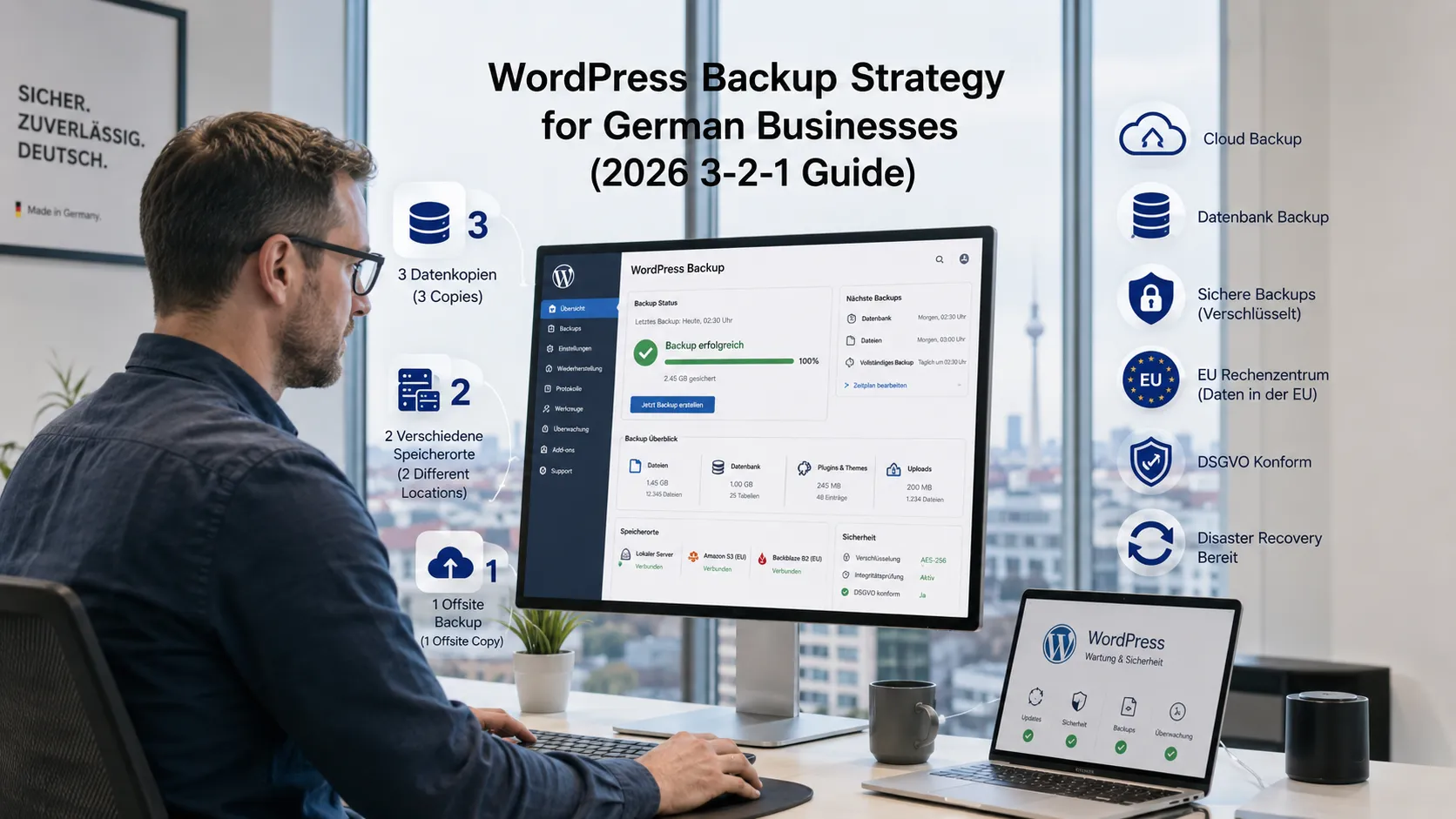
What is the 3-2-1 backup rule, and why does it matter for German businesses?
The 3-2-1 rule is the industry standard for data protection:
- 3 copies of your data (one production + two backups)
- 2 different storage media or services (so one failure doesn’t take down both)
- 1 offsite copy (protected against fire, theft, ransomware affecting the primary site)
For a German WordPress site in 2026, that translates to:
- Copy 1: live site on your German host (Hetzner / Mittwald / Raidboxes / IONOS)
- Copy 2: nightly backup to a secondary location (Hetzner Storage Box, separate Hetzner volume, or your host’s built-in backup)
- Copy 3: weekly off-host backup to a different provider entirely (AWS Frankfurt S3, Google Cloud Storage EU, or Wasabi EU)
Add encryption-at-rest and encryption-in-transit, plus a restore test schedule, and you have a defensible strategy.
The German Datenschutzbehörden have increasingly cited DSGVO Article 32 (security of processing) when issuing fines after incidents — and “we had no usable backup” is one of the worst findings to have on record.
What needs to be backed up on a WordPress site?
Four distinct components, often overlooked individually:
The database
The most critical and the most often missed in incomplete backups. Contains: all content (posts, pages, products), user accounts, settings, orders, customer data, comments. WordPress is essentially nothing without its database.
The /wp-content/ directory
Contains: themes, plugins, uploaded media (images, PDFs, videos), customer files (if you sell digital products). Without this, your database has references to images that no longer exist.
wp-config.php and root files
Contains: database credentials, security keys, custom configuration. Often forgotten because they sit in the WordPress root rather than /wp-content/.
Web server configuration (if self-hosted)
.htaccess, Nginx config, PHP settings, SSL certificates. On managed hosting (Mittwald, Raidboxes) these are managed for you. On Hetzner VPS or self-hosted setups, they must be backed up separately.
A “backup” that only includes the database is half a backup. A backup that only includes /wp-content/ is half a backup. You need both, plus root files.
What are the best WordPress backup plugins for German businesses in 2026?
The realistic comparison.
| Plugin | Price (EUR/yr) | EU Storage Out-of-Box | Incremental | Encryption |
|---|---|---|---|---|
| UpdraftPlus Premium | $70–$195 (~€65–€180) | Optional (connect EU bucket) | Yes (Premium) | Yes (with key) |
| BlogVault | $89–$359 (~€85–€330) | Yes (their managed storage) | Yes | Yes |
| Solid Backups (BackupBuddy) | $99–$199 (~€95–€190) | Optional | Yes | Yes |
| WPVivid Premium | $59–$199 (~€55–€185) | Optional | Yes | Yes |
| All-in-One WP Migration | Free + extensions | Optional | Limited | Limited |
| BackWPup | Free + Pro €69 | Optional | Yes (Pro) | Yes (Pro) |
| Duplicator Pro | $99–$799 (~€95–€755) | Optional | Yes | Yes |
For most German clients we recommend two patterns:
- UpdraftPlus Premium + Hetzner Storage Box (S3-compatible) + AWS Frankfurt S3 as second copy — full control, EU-resident, defensible DSGVO posture.
- BlogVault — managed service, simpler to set up, automatic incremental backups, but their default storage is US-region (clarify EU storage availability before committing).
For sites under 5GB, the free version of UpdraftPlus plus a low-cost Hetzner Storage Box is a strong starter setup at near-zero cost.
What backup storage works best for German DSGVO compliance?
Five solid options, ranked by simplicity for a German business:
Hetzner Storage Box
S3-compatible, 1TB starts at around €4/month, hosted in Falkenstein or Nürnberg. Cleanest DSGVO story.
Strato / IONOS HiDrive / TeamDrive
German-hosted cloud storage with DSGVO-ready AVVs. Slightly less S3-native than Hetzner but native German support.
AWS S3 in eu-central-1 (Frankfurt)
S3 standard pricing applies (~$0.023/GB/month). Excellent reliability and durability, signed DPA with AWS. Used by many enterprise German clients.
Wasabi EU storage (Frankfurt)
S3-compatible at a flat rate (~$6.99/TB/month) with no egress fees. Cost-effective for larger backups, EU-hosted.
Backblaze B2 (EU region)
Backblaze offers an EU region at low cost. S3-compatible API. Used widely in German agency setups.
Avoid: AWS S3 in us-east-1, Google Cloud Storage in us-central1, Dropbox personal accounts (US-hosted, not enterprise-DPA), Google Drive personal. These work technically but create a DSGVO conversation that’s hard to defend if asked.
How often should a German WordPress site back up?
Depends on how dynamic the site is. Three tiers:
Low-change site (brochure / company site)
Content updates 1–2 times per month. Database changes are minor.
- Database: daily
- Files: weekly
- Off-host copy: weekly
Medium-change site (active blog, lead-gen, small WooCommerce)
Daily content, regular customer activity.
- Database: every 6 hours (or after every transaction for WooCommerce)
- Files: daily
- Off-host copy: daily
High-change site (active e-commerce, membership, course platform)
Customers transact and produce data constantly.
- Database: hourly or continuous binlog
- Files: daily (or after every upload)
- Off-host copy: at least daily
For high-change WooCommerce sites, configure MySQL binary log shipping to a secondary database server. Many German clients run this on a Hetzner VPS for €5–€15/month as cold standby.
How long should backups be retained?
A practical retention policy for German businesses:
- Daily backups: 14 days (1–2 weeks of rollback options)
- Weekly backups: 8 weeks (2 months of older state)
- Monthly backups: 12 months (a year of monthly snapshots)
- Annual backup: 5 years (regulatory and forensic value)
Total storage: roughly 60–80 backup copies at any time. For most WordPress sites under 10GB, that’s well under 1TB of total storage — fits comfortably in a €5–€10/month storage budget.
For e-commerce sites under GoBD scope, financial transaction records have a 10-year retention requirement that may need to be addressed separately.
How do you encrypt WordPress backups for DSGVO?
Three layers of encryption matter:
Encryption at rest
Your storage provider should encrypt files on disk. Hetzner Storage Box, AWS S3, Wasabi, Backblaze B2 all do this by default.
Encryption in transit
Backups travel from your WordPress server to the storage destination via HTTPS / TLS. Most plugins do this automatically; verify in plugin settings.
Client-side encryption
For sensitive backups (e-commerce with customer data, membership sites with personal data), encrypt BEFORE uploading using a passphrase you control. UpdraftPlus Premium, Solid Backups, and WPVivid all offer this. Store the passphrase separately from the backups — losing it means losing access to your own backups.
For high-stakes data, encrypt with a passphrase your hosting provider doesn’t have. That’s the difference between “backup compromise” and “data breach.”
How do you actually restore a WordPress backup?
The four-step process, simplified:
- Provision a clean WordPress install (new directory, fresh database).
- Restore the database from the backup file (.sql or .gz).
- Restore the /wp-content/ directory (themes, plugins, uploads).
- Update wp-config.php with the new database credentials if needed.
Most backup plugins automate steps 2–4 with a one-click restore. But you should know the manual process — when the automation fails (and it sometimes does), you’ll need to do it by hand at 2am.
Bonus step: test restores every quarter. The single most common failure pattern we see is “we had backups, but no one had tested a restore in 18 months, so when we tried, the database was incomplete.” A backup you’ve never restored is a hope, not a backup.
What are the biggest WordPress backup mistakes German businesses make?
Five patterns dominate audit findings:
Backups on the same server as the website
If the server fails or gets compromised, both copies are gone. Always store at least one copy off-host.
No database in the backup
Some setups back up only the file system. Without the database, you have a broken WordPress install. Verify the database is included on every backup type.
Untested restores
The backups exist. They’ve never been tested. When you actually need them, you discover they’re corrupted, partial, or in a format the new server can’t read. Run quarterly restore tests on a staging environment.
No encryption key management
Backups are encrypted but the only person with the passphrase left the company. The backups become unrecoverable. Document encryption keys in your password manager with redundant access for at least two people.
Storage that exits the EU
Backups end up in S3 us-east-1 because it was the default option. Six months later a Datenschutzbehörde asks where personal data lives — and you have an answer that’s hard to defend. Pick EU storage from day one.
How does WordPress backup fit into a maintenance plan?
Backups are one of five core pillars of a real WordPress maintenance plan:
- Backups (this guide)
- Security patching (WordPress core, themes, plugins)
- Performance monitoring (Core Web Vitals, uptime)
- Update testing (staging environment before production)
- Restore drills (quarterly)
For most German SME WordPress sites, a maintenance plan that bundles these costs €79–€199/month at the Standard tier and €199–€499/month at the Pro tier — covered in detail in our WordPress maintenance pricing guide.
A standalone backup plugin is a tool. A maintenance plan is the discipline of using it properly.
When should you build a custom WordPress backup system?
Almost never. The off-the-shelf plugins cover 95% of needs. Custom makes sense when:
- You’re running a WordPress multisite at enterprise scale with custom retention rules per tenant
- You have regulatory requirements (financial, healthcare) that no plugin fully meets
- You’re integrating backups into a broader DR plan with RPO/RTO targets stricter than 24 hours
- You have specific binary log shipping requirements (real-time DB replication beyond what plugins offer)
Custom mysqldump + rsync + S3 CLI backup systems with CI/CD orchestration typically cost €4,000–€15,000 to build. Everyone else should usually configure UpdraftPlus or BlogVault.
To explore the build vs. buy decision further, see our custom WordPress plugin development guide.
Frequently Asked Questions About WordPress Backup Strategy in Germany
UpdraftPlus Premium + Hetzner Storage Box / AWS Frankfurt S3; BlogVault for managed; WPVivid for self-hosted.
Daily DB + weekly files for brochure; every 6h DB + daily files for active sites; hourly DB for e-commerce.
EU-resident storage with DPA — Hetzner Storage Box, AWS Frankfurt, Wasabi EU, Backblaze B2 EU.
€60–€400/year typical; €500–€3,000/year enterprise.
As one of three copies, yes — never as your only copy. Always keep an off-host copy.
14 daily + 8 weekly + 12 monthly + 5 annual; separate 10-year retention for GoBD records.
Quarterly restore drills to staging; verify site loads and queries return expected data.
Yes if you restore from a pre-compromise backup, patch the vulnerability, and force password resets.
Ready to set up a real backup strategy?
A real WordPress backup strategy is one of the cheapest pieces of insurance a German business can buy — but only if it’s set up correctly with EU storage, encryption, and tested restores.
If you want a 30-minute scoping call where we map out the right backup architecture for your specific WordPress setup, book a meeting or send the details via our contact page.
Need expert help? Gem Programmers provides web design and development services for businesses in Germany, Austria and Switzerland. Request a free, no-obligation quote and get a clear plan with scope, timeline and price.