WordPress powers 43% of all websites in 2026 — from solo blogs to Fortune 500 corporate sites. The platform’s dominance is earned: it’s flexible, well-supported, SEO-friendly, and backed by an ecosystem of themes, plugins, and developers larger than any competitor. But “using WordPress” and “using WordPress well” are two very different things. A poorly configured WordPress site loads slowly, leaks security holes, and converts visitors badly. A professionally developed one is fast, secure, scalable, and built to grow with your business.
This guide explains what professional WordPress development services actually include, when they make sense, what they cost, and how to evaluate development partners. No filler, no generic claims — just the concrete decisions a business owner needs to make when investing in a serious WordPress site.
What do professional WordPress development services include?
Professional WordPress development services typically cover the full lifecycle of a site — not just the initial build but ongoing performance, security, and growth. The standard scope:
Strategy and discovery
Before any code, a professional engagement defines goals, audience, competitive context, conversion paths, and success metrics. Skipping discovery is the most common reason WordPress projects fail — the site gets built, but it doesn’t solve the business problem.
Custom design or theme customization
You have three real options: a fully custom design built from Figma to code, deep customization of a premium theme (Astra, GeneratePress, Kadence), or a page-builder approach (Elementor, Bricks, Breakdance). Each has trade-offs in cost, speed, flexibility, and long-term maintenance. Custom design costs more but produces unique brand experience; theme customization balances cost and quality; page builders are fastest but add overhead.
Custom development
Beyond themes, custom development covers features that don’t exist off-the-shelf: custom post types, integrations with CRM or ERP systems, custom Gutenberg blocks, REST API endpoints, membership systems, complex search functionality, and headless WordPress setups using Next.js or similar frontends.
Performance optimization
Out-of-the-box WordPress isn’t fast. Real performance requires caching configuration (LiteSpeed Cache, WP Rocket, or server-side), image optimization (WebP/AVIF, responsive sizes, lazy loading), database optimization, code minification, and CDN setup (Cloudflare, BunnyCDN). Core Web Vitals — LCP under 2.5s, INP under 200ms, CLS under 0.1 — are the minimum for serious sites.
Security hardening
WordPress is the most-targeted CMS for attacks because of its scale. Real security includes WAF setup, login hardening, file permission audit, plugin/theme vetting, database lockdown, regular automated backups (with off-site storage), malware scanning, and incident response procedures. Wordfence, Sucuri, and Patchstack are common tools.
SEO foundations
Schema markup, semantic HTML, proper heading hierarchy, sitemap generation, robots.txt configuration, canonical URLs, hreflang for multilingual sites, Yoast SEO or Rank Math configuration, and Core Web Vitals optimization. Done correctly, these foundations support rather than undermine your content efforts.
Hosting and infrastructure
Shared hosting is rarely adequate. Managed WordPress hosts (Kinsta, WP Engine, Cloudways, Hetzner) provide performance, security, and support tailored for WordPress workloads. Choice depends on traffic volume, geographic audience, budget, and required uptime SLA.
Maintenance and support
WordPress requires ongoing care: weekly plugin and core updates with staging testing, security monitoring, performance monitoring, backup verification, and emergency response. Sites without maintenance get hacked, slow down, or break within months.
When does it make sense to invest in professional WordPress development?
Professional development pays back when one of these is true:
- Your website is mission-critical for revenue (e-commerce, SaaS, professional services with high lifetime value per customer)
- You need custom functionality that off-the-shelf themes and plugins can’t deliver
- You’re scaling beyond what a DIY setup can handle (traffic, content volume, user count)
- Your industry has compliance requirements (DSGVO/GDPR, HIPAA, accessibility standards)
- You’ve outgrown a freelancer or in-house developer and need agency-level coordination
- You’re recovering from a poorly built site that’s causing visible business problems
It does NOT make sense when: you’re testing an idea (use a simple template), you’re a solo creator with minimal commercial intent, or you can’t articulate specific business outcomes the site should deliver.
What does professional WordPress development actually cost?
Realistic 2026 pricing for serious WordPress development engagements:
- Small business site (10–20 pages, theme-based, no custom functionality): $4,000–$12,000 one-time
- Mid-market business site (20–60 pages, custom design, basic integrations): $12,000–$45,000 one-time
- Custom WordPress development (membership, LMS, complex integrations, headless): $30,000–$150,000+ one-time
- WooCommerce store (mid-size catalog with integrations): $15,000–$80,000 one-time
- Enterprise WordPress (multisite, custom plugins, performance at scale): $80,000–$500,000+
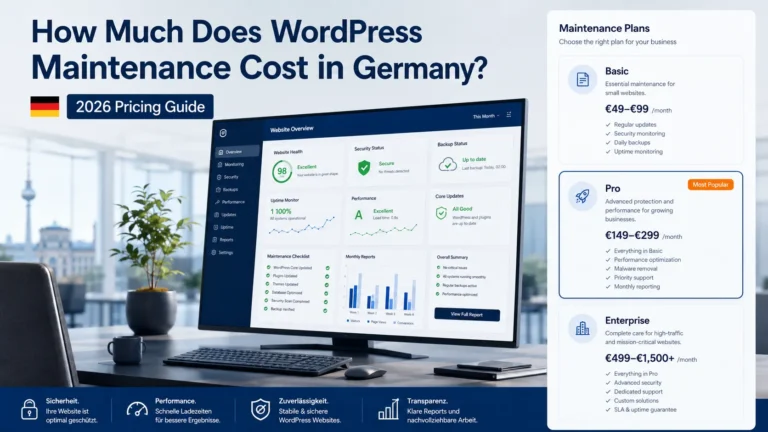
- Ongoing maintenance: $150–$2,500/month depending on scope
Hourly rates for serious WordPress developers range $75–$200/hour for freelancers, $150–$300/hour for boutique agencies, $200–$400/hour for mid-sized agencies. Below $50/hour, you’re getting a junior developer or someone in a low-cost region — quality varies dramatically.
What does the development process actually look like?
A typical engagement runs 6–20 weeks depending on scope. The major phases:
Weeks 1–2: Discovery and strategy
Audience research, competitive analysis, content audit (if migrating an existing site), conversion goal definition, technical requirements documentation, and information architecture. Deliverables: site map, content inventory, technical specs.
Weeks 3–4: Design
Wireframes, then high-fidelity designs in Figma for key page types. Design system established (colors, typography, components, spacing). Mobile-first responsive design, accessibility considered from the start. Client review and approval before development begins.
Weeks 5–12: Development
Theme development or customization, custom blocks, plugin integration, content migration if applicable, custom functionality build, third-party integrations (CRM, marketing automation, payment gateways), responsive testing across devices and browsers.
Weeks 13–16: QA and optimization
Performance optimization (Core Web Vitals), security hardening, SEO foundations setup, accessibility audit (WCAG 2.2), cross-browser testing, mobile testing on real devices, load testing for traffic spikes, content review.
Weeks 17–18: Launch
DNS configuration, SSL setup, search engine submission, analytics implementation, Search Console setup, redirect strategy from old URLs, monitoring during launch window, hotfix capacity ready for first 72 hours.
Post-launch: Ongoing maintenance
Plugin and core updates on a staging environment, weekly backup verification, monthly performance review, quarterly security audit, content updates, ongoing optimization based on analytics. Without maintenance, the site degrades.
How do you evaluate a WordPress development partner?
Questions that separate competent partners from polished ones:
- Can you show me three live sites you built in my industry, with the developer who built them?
- What’s your approach to performance optimization? Specifically, what tools and techniques do you use to hit Core Web Vitals?
- How do you handle security? What’s your incident response plan if a site you built gets compromised?
- What’s included in maintenance vs charged separately?
- Do you use page builders, custom themes, or both? Why?
- Who owns the code at the end of the project — me or you?
- How do you handle scope changes during the project?
- What’s your average client tenure?
Red flags: agencies that won’t share their tools and process, fixed-price quotes without discovery, refusal to provide references, locked-in proprietary frameworks, hourly rates below $50 for senior work, promises of “unlimited revisions.”
What WordPress development mistakes hurt businesses most?
Patterns we see destroy WordPress projects:
- Plugin sprawl. 40+ plugins installed, half unused, half conflicting. Every plugin adds attack surface, performance overhead, and update complexity. Serious sites run 10–20 well-chosen plugins.
- Nulled themes and plugins. Pirated premium themes are riddled with backdoors and malicious code. Always license legitimately.
- Page builder lock-in. Building extensively in Elementor or Divi makes future migration painful. Heavy page builders also hurt performance.
- No staging environment. Pushing untested changes directly to production breaks sites. Real WordPress workflows use staging.
- Ignored updates. Sites running months-old WordPress core or plugins get compromised. Weekly update cadence with staging testing is the minimum.
- No backups, or untested backups. A backup you’ve never restored isn’t a backup. Test restoration quarterly.
- Bloated themes. Multipurpose themes with 50 demos loaded inflate CSS/JS by megabytes. Lightweight themes (Astra, Kadence, GeneratePress) outperform.
- Default permalinks. /?p=123 is the default URL structure; it’s terrible for SEO and user comprehension. Switch to /%postname%/ immediately.
How does WordPress development integrate with broader business goals?
A WordPress site is an asset only if it serves business outcomes. The integrations that matter:
- SEO services — the site’s technical foundation supports or undermines all SEO work
- Conversion rate optimization — page templates, forms, and CTAs determine whether traffic converts
- Digital marketing — landing pages, tracking, marketing automation integrations
- CRM integration — HubSpot, Salesforce, Pipedrive form connections and lead routing
- Marketing automation — ActiveCampaign, Brevo, HubSpot for nurture sequences
- Analytics — GA4 with server-side tracking for accurate attribution
A WordPress site that isn’t integrated with these systems delivers a fraction of its potential value.
What about WooCommerce specifically?
WooCommerce powers roughly 30% of all e-commerce stores globally. It’s the right choice when you need WordPress’s flexibility plus e-commerce, when you have an existing WordPress site, or when you want to avoid platform-fee structures of Shopify-style hosted solutions. It’s not the right choice for very small stores (Shopify is simpler), very large stores (specialized platforms scale better), or stores without strong technical support (WooCommerce requires more maintenance than hosted alternatives).
Professional WooCommerce development covers: theme/product page customization, payment gateway integration (Stripe, PayPal, Apple Pay), shipping configuration, tax handling, subscription support (WooCommerce Subscriptions), B2B features (wholesale, custom pricing), multi-currency for international markets, and performance optimization (WooCommerce is notoriously heavy on databases).
How do you migrate to WordPress from another platform?
Common migrations and what they involve:
- From Wix: content needs manual migration or third-party tools; URL structures differ significantly; redirect strategy critical for SEO
- From Squarespace: similar challenges to Wix; export tools exist but require cleanup
- From Shopify to WooCommerce: product data migration via CSV; customer accounts; order history; URL redirects
- From custom CMS: typically the hardest; requires data export, transformation, and import scripts
The risk in any migration is SEO. Without proper 301 redirects from old URLs to new, traffic drops significantly. A serious migration includes a complete redirect map, sitemap submission, and 60–90 days of careful monitoring post-launch.
Frequently asked questions about WordPress development services
How long does professional WordPress development take?
6–12 weeks for a typical small-to-mid-market business site with theme-based development. 16–26 weeks for custom design and custom functionality. 26–52 weeks for enterprise WordPress with multi-site, custom plugins, or headless architecture.
Should I use a page builder like Elementor, or custom code?
Depends on who maintains the site. Page builders let non-developers update layouts but add performance overhead and create vendor lock-in. Custom development performs better and offers more flexibility but requires developer access to update. Best practice for many businesses: custom-themed site with Gutenberg block editor for content updates.
Is WordPress good for SEO?
Yes, when configured well. WordPress’s flexibility, semantic HTML generation, and ecosystem of SEO plugins (Yoast, Rank Math) make it one of the most SEO-friendly platforms. The catch: out-of-the-box configuration isn’t optimized. Professional development includes proper schema, performance optimization, sitemap configuration, and technical SEO foundations.
Can I manage my WordPress site myself after launch?
Yes, for content updates. WordPress’s content editor is intentionally accessible to non-developers — you can create pages, post articles, manage media, and update copy. For technical changes (plugins, themes, custom development), you’ll still need developer help. Many businesses self-manage content and contract for technical work.
What hosting should I use for a serious WordPress site?
For most businesses: managed WordPress hosting (Kinsta, WP Engine, Cloudways, or Hetzner-based managed providers). For EU/DSGVO-focused sites: Hetzner or other EU-hosted managed solutions. Avoid: GoDaddy shared hosting, Bluehost, and other budget shared plans — they cause performance and reliability problems that cost more in lost conversions than the hosting savings.
How do I keep my WordPress site secure?
Weekly plugin and core updates with staging testing; strong passwords plus 2FA on admin accounts; reputable security plugin (Wordfence, Sucuri, Patchstack); regular off-site backups; HTTPS everywhere; restrict login attempts; vet plugins before installing; remove unused themes and plugins. Most WordPress hacks happen because of unpatched plugins or weak admin passwords — fix both.
What’s the difference between WordPress.com and WordPress.org?
WordPress.org is the self-hosted open-source software you install on your own hosting — full control, all themes and plugins, used for serious business sites. WordPress.com is a hosted service from Automattic with restrictions on plugins, themes, and customization in lower tiers. For business development, WordPress.org is almost always the correct choice.
Ready to talk about WordPress development?
WordPress remains the most flexible, well-supported, and cost-effective platform for serious business websites in 2026 — when developed professionally. The platform’s flexibility is also its risk: a poorly built WordPress site causes more problems than a simple template. Investing in real development pays back over the lifetime of the site.
Book a meeting for a free WordPress strategy consultation — we’ll review your current site (or planned project), identify the highest-leverage decisions, and outline a realistic scope and budget. Or browse our website development services and contact us directly.
Most Asked Questions
Strategy and discovery, custom design or theme customization, custom development for unique functionality, performance optimization to hit Core Web Vitals, security hardening, SEO foundations, hosting setup, and ongoing maintenance. A full lifecycle service — not just building the site but keeping it fast, secure, and growing.
Small business sites: $4,000–$12,000. Mid-market business sites: $12,000–$45,000. Custom WordPress with complex functionality: $30,000–$150,000+. WooCommerce stores: $15,000–$80,000. Enterprise WordPress: $80,000–$500,000+. Ongoing maintenance: $150–$2,500/month.
6–12 weeks for typical business sites with theme-based development. 16–26 weeks for custom design with custom functionality. 26–52 weeks for enterprise WordPress with multi-site, custom plugins, or headless architecture.
Yes, when configured well. WordPress’s flexibility, semantic HTML, and ecosystem of SEO plugins make it one of the most SEO-friendly platforms. Out-of-the-box configuration isn’t optimized — professional development includes proper schema, performance optimization, and technical SEO foundations.
Yes for content updates — WordPress’s editor is accessible to non-developers. For technical changes like plugins, themes, and custom development, you’ll need developer help. Many businesses self-manage content and contract for technical work.
Yes. WordPress requires weekly plugin and core updates with staging testing, regular backup verification, security monitoring, and performance review. Sites without maintenance get hacked, slow down, or break within months. Budget $150–$2,500/month depending on site complexity.
Yes, via WooCommerce — it powers roughly 30% of online stores globally. Best when you need WordPress’s flexibility plus e-commerce. Less ideal for very small stores (Shopify is simpler) or very large stores (specialized platforms scale better).