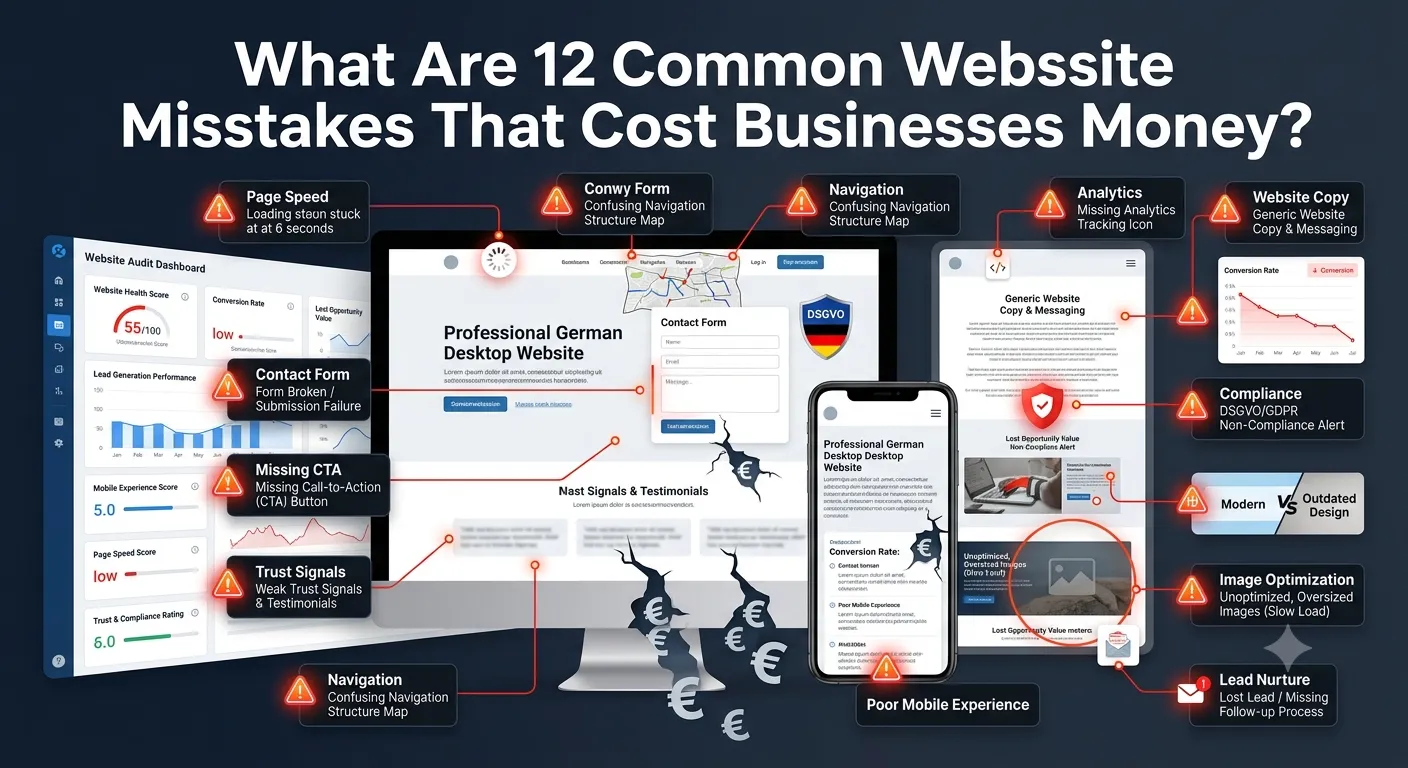
Most SME owners assume a “decent” website is fine and the lack of leads is a marketing problem. After hundreds of audits, we can say flatly: it usually isn’t. The same 12 common website mistakes that cost businesses money show up again and again — small details that quietly burn revenue every week, often invisibly to the owner.
This guide names each mistake, attaches a realistic financial impact, and gives you the quick-win fix. Most can be addressed in a weekend without rebuilding anything.
Why do small website mistakes cost so much?
Most website issues don’t fail loudly. They quietly cost you 5–15% of potential leads, every day, for months. A site getting 5,000 monthly visits with a 1.5% conversion rate that should be 3% is leaking roughly 75 leads per month — or hundreds of thousands in pipeline value over a year.
Fixing two or three of these mistakes typically delivers 50–150% lead-volume improvement inside 30 days, with almost no marketing budget needed.
Mistake 1: Is your mobile load time too slow?
Google’s research is unambiguous: bounce rate jumps 32% as mobile load time goes from 1 to 3 seconds, and 90% at 5 seconds. Your German SME competitors load in under 2.5 seconds. If yours takes 6 seconds on mobile, you’re losing roughly a third of mobile visitors before they see your homepage.
Quick fix:
- Compress all images to WebP / AVIF (TinyPNG, ShortPixel)
- Enable a caching plugin (WP Rocket, FlyingPress, NitroPack)
- Move to Hetzner, IONOS, or Mittwald hosting if currently on shared budget hosting
- Run PageSpeed Insights — target sub-2.5s LCP on mobile
Realistic cost to fix: €0–€500 in tools + 4–8 hours of work.
Mistake 2: Is your above-the-fold CTA missing or weak?
Visitors land, see a generic hero image with vague text like “Welcome to our company,” scroll briefly, and leave. The single biggest conversion lever isn’t design polish — it’s whether the first thing the visitor sees tells them what to do.
Quick fix:
- One primary CTA above the fold, in a contrasting colour
- Action-specific language: “Get a free quote”, “Book a 15-min call”, “Start your free trial”
- Avoid “Submit”, “Learn more”, “Click here”
Realistic cost to fix: half a day of copywriting + 1 hour of design.
Mistake 3: Is your contact form hidden or broken?
It’s depressingly common: a contact form has been broken for three months, the email goes to a folder no one checks, or the form is buried four clicks deep in the footer.
Quick fix:
- Test your contact form weekly from an unrelated email account
- Add UTM tracking to your thank-you page (visible in GA4)
- Add a contact CTA in the footer of every page
- Add click-to-call phone number link on mobile
Realistic cost to fix: 1 hour to test and add tracking. Recovery: priceless.
Mistake 4: Are your trust signals missing or weak?
Especially in Germany, where consumer trust is built carefully, missing trust signals quietly destroy conversion. No Trusted Shops seal, no testimonials, no customer logos, no certifications — and the visitor moves on to a competitor who has them.
Quick fix:
- Add 3–5 customer logos near the hero or just below
- Add 2–3 testimonials (with name, photo, role) on key pages
- Add Trusted Shops or ProvenExpert badge for shops
- Show team photos, office address, years in business
Realistic cost to fix: half a day of asset gathering + a small design tweak.
Mistake 5: Is your navigation menu confusing?
Some sites have 12 top-level menu items. Others bury the most important pages three levels deep. Both fail the “5-second test” — can a new visitor figure out what you do and how to act in five seconds?
Quick fix:
- Maximum 5–7 top-level menu items
- Lead with what visitors care about, not internal company structure
- Always include: Services / Products, Pricing (if relevant), Case Studies, About, Contact
- Add a prominent CTA button in the menu (not just “Contact”)
Realistic cost to fix: an afternoon of menu reorganisation.
Mistake 6: Are you missing mobile optimisation?
This isn’t 2015. Over 60% of B2B research and 70%+ of B2C traffic now starts on mobile. A site that “works on mobile” but has tap targets too small, horizontal scrolling, or forms that don’t fit the viewport loses most of those visitors.
Quick fix:
- Buttons minimum 44×44 pixels
- Single-column layout on mobile
- Sticky bottom CTA bar on mobile pages
- Test your contact form on a real phone — not Chrome DevTools
Realistic cost to fix: 1–3 days of mobile-specific design fixes.
Mistake 7: Are your analytics and conversions tracked correctly?
You can’t fix what you can’t measure. Sites running without GA4, or with goals set up incorrectly, fly blind on what’s working and what isn’t.
Quick fix:
- Install GA4 with Google Tag Manager
- Mark contact-form submission, demo booking, file download as conversions
- Set up Microsoft Clarity (free) for session recordings and heatmaps
- Set up Search Console for SEO data
Realistic cost to fix: 4–8 hours one-time setup.
Mistake 8: Is your copy stale, generic, or company-centric?
“We are a leading provider of innovative solutions” tells the visitor nothing. Copy that talks about the visitor’s problem — and how you solve it — converts dramatically better.
Quick fix:
- Rewrite hero copy using: “We help [audience] [solve problem] without [common frustration].”
- Use the visitor’s words from sales calls, not internal jargon
- Specific > generic. “GDPR-compliant Shopify shop launched in 6 weeks” beats “fast delivery, full compliance”
Realistic cost to fix: a day with a good copywriter, or 2 days DIY.
Mistake 9: Are you missing GDPR / DSGVO compliance?
This is uniquely costly for German businesses. Missing or non-compliant cookie banners, Google Fonts loaded from CDN, missing AVV with hosting — each is an Abmahnung waiting to happen.
Quick fix:
- Install Borlabs Cookie or Real Cookie Banner (proper opt-in)
- Self-host Google Fonts (download locally)
- Sign AVV with hosting provider (Hetzner, IONOS provide this)
- Update Impressum and Datenschutzerklärung with a lawyer-reviewed template
Realistic cost to fix: €200–€1,500 in compliance tools + €500–€2,000 for legal text.
Mistake 10: Is your visual design outdated?
Founders often resist redesigning a site that “still works.” But visitors form a trust judgement within 50 milliseconds of landing, and sites that look like they’re from 2015 lose that judgement reliably.
Telltale signs your site looks dated:
- Stock photos that obviously look like stock photos
- Hero image sliders / carousels (proven to hurt conversion)
- Tiny typography (under 16px body text)
- Cluttered footer with 40+ links
- Generic Bootstrap-template layout
Quick fix: doesn’t need a full rebuild. A typography upgrade, modern hero, replaced stock photos, and removed sliders can transform perceived modernity in a week.
Mistake 11: Are you missing page speed or image optimisation?
Beyond the load-time issue in Mistake 1, specific image issues hurt repeatedly:
- Massive PNG / JPG images served at full resolution on mobile
- No lazy loading for below-fold images
- No CDN for image delivery
- Decorative images with no compression strategy
Quick fix:
- Mass-convert images to WebP (any modern image plugin)
- Enable lazy loading (native HTML attribute or plugin)
- Use Cloudflare free tier as CDN
- Strip EXIF metadata from uploads
Mistake 12: Are you missing a follow-up process when leads come in?
If your website does its job and a lead fills out the form, but no one follows up within 24 hours, you’ve wasted everything that came before. Studies consistently show contacting a lead within 5 minutes vs 24 hours can 10x your close rate.
Quick fix:
- Auto-acknowledgement email on form submit (sets expectations)
- Lead routing to a single named owner with an SLA
- CRM integration (HubSpot, Pipedrive) so leads can’t fall through cracks
- Calendar booking link (Calendly, Cal.com) for leads to self-schedule
How do you find your top 3 issues in a 60-minute audit?
Use this checklist sequentially:
- PageSpeed Insights: test homepage + top landing page (mobile + desktop)
- Mobile real-device test: open the site on your phone, try to fill out a contact form
- GA4 check: is it installed and are conversions tracking correctly?
- Form test: submit a form yourself, did you get an email and did sales follow up?
- 5-second test: ask a non-employee to look at your homepage for 5 seconds, then ask “what does this business do, and what action would you take?”
- GDPR check: is the cookie banner compliant, are Google Fonts self-hosted?
- Trust signal scan: count testimonials, customer logos, trust seals
- Copy review: does your hero talk about the customer’s problem or your company?
By the end of this hour, you’ll have a ranked list of three issues that, if fixed, will likely move conversion by 30–80% in 30 days.
DIY fixes vs bringing in a specialist: which works?
Most of these mistakes are fixable in-house:
- DIY-fixable: speed (caching plugin), CTA copy, contact form testing, GDPR plugins, image optimisation, navigation cleanup, follow-up process
- Worth a specialist: redesign for outdated visual identity, conversion-tested copy rewrite, A/B testing infrastructure, deep mobile UX optimisation, structured data + schema
For a structured fix programme, our Conversion Rate Optimization services page covers the full audit-to-implementation cycle.
What’s a 30-day fix sprint plan?
If you have one focused month:
- Week 1: Speed + mobile + analytics installed/audited
- Week 2: CTA rewrite + contact form test + trust signals added
- Week 3: GDPR full compliance + Google Fonts self-hosted
- Week 4: Copy review + follow-up process + measure results in GA4
Most SMEs see 40–120% lead-volume improvement from one focused 30-day sprint.
Frequently asked questions about common website mistakes that cost businesses money
Slow mobile load time. A site over 4 seconds on mobile loses 30%+ of traffic.
Steady traffic but flat inquiries, mobile conversion far below desktop, or bounce rate over 70%.
Median German SME site has 6–8 of these 12 issues active at once.
DIY: €500–€2,000 plus 30–60 hours. Agency CRO sprint: €3,000–€12,000. ROI 5–10x in year one.
No. Most fixes are surgical — hosting, copy, trust, GDPR, mobile. Redesign only if the design is genuinely outdated.
5,000 visits at 1% vs 2.5% conversion = ~75 leads/month lost, ~€100k+ pipeline annually.
DIY if a marketing person has 4 hrs/week. Otherwise a €3k–€8k CRO sprint pays back in weeks.
Ready to fix common website mistakes that cost businesses money?
These 12 mistakes account for the majority of underperforming websites in Germany. Most aren’t expensive to fix; they’re invisible because no one specifically audits for them. Run the 60-minute checklist, pick the three biggest, and fix them this month. The compounding revenue impact almost always exceeds expectations.
If you’d like a free 20-minute audit of your current site with prioritised fixes, you can book a meeting with our team or learn more about our CRO services.